Webinar Recording
See Atlas in Action: From Idea to AI Simulation

On-demand webinar

Build AI simulations 
using natural language

This recorded session shows how to build AI simulations in plain language. Atlas is an agentic harness that turns a written description into an interactive learning experience and deploys it to your learners through your LMS. It is for instructors, instructional designers, and learning teams who need custom simulations without a development project. Watch the team build one live from an attendee’s request, then launch it inside Canvas via LTI.

Captions available

Presenters
Sanjay Srivastava Founder and CEO, Vocareum
Mary Gordanier Solutions Engineer
Andrew Liang Product Manager, Atlas
Key Takeaways

What the session established about AI simulations

Teams

A simulation can run across a team, not just one learner

Team support is a standard part of the Vocareum platform, so an Atlas experience can be built for groups rather than individuals. Because teams share a database on the back end, an instructor can design a scenario where one team’s decisions change the conditions the others are working in.

Assessment

Learner work becomes grades in your gradebook

Atlas generates a rubric you can revise by asking, and scoring can be deterministic decision-path weights, AI assessment against that rubric, or a hybrid of preset points plus AI feedback. Configured as an assessment, the raw attempt transcript posts to Vocareum’s grading API, which is how a learner’s decisions become numeric grades. Instructor dashboards show class-level metrics and per-learner detail.

Control

You decide how much AI runs, and on whose terms

An application can be fully deterministic so every learner sees the same thing, or it can call a model as they work. Atlas is model-agnostic at build and at runtime, and the AI Gateway holds the controls: which models are available, fine-grained budgets, moderation, and bring-your-own-key for data governed under your existing cloud agreement.

What was demonstrated

How to build AI simulations: the workflow shown on the call

Three phases, start to finish, exactly as they ran on the call.

01

Describe the simulation

One paragraph, pasted exactly as written. Atlas did not start building. It returned three design decisions and waited: one authored scenario or a fresh one per learner, rubric or decision-path scoring, live stakeholder conversations or scripted replies.

How to build AI simulations in Atlas: the agent asking how the branching scenario should be created and how students should be scored, before it starts building
It interviews the builder before writing anything.
02

Atlas builds the simulation

You pick the model from the list your organization has enabled. Atlas worked through its own checklist, and about twenty minutes later the application existed: prebrief, branching decisions, a stakeholder to interview, a required rationale, a rubric, an instructor view.

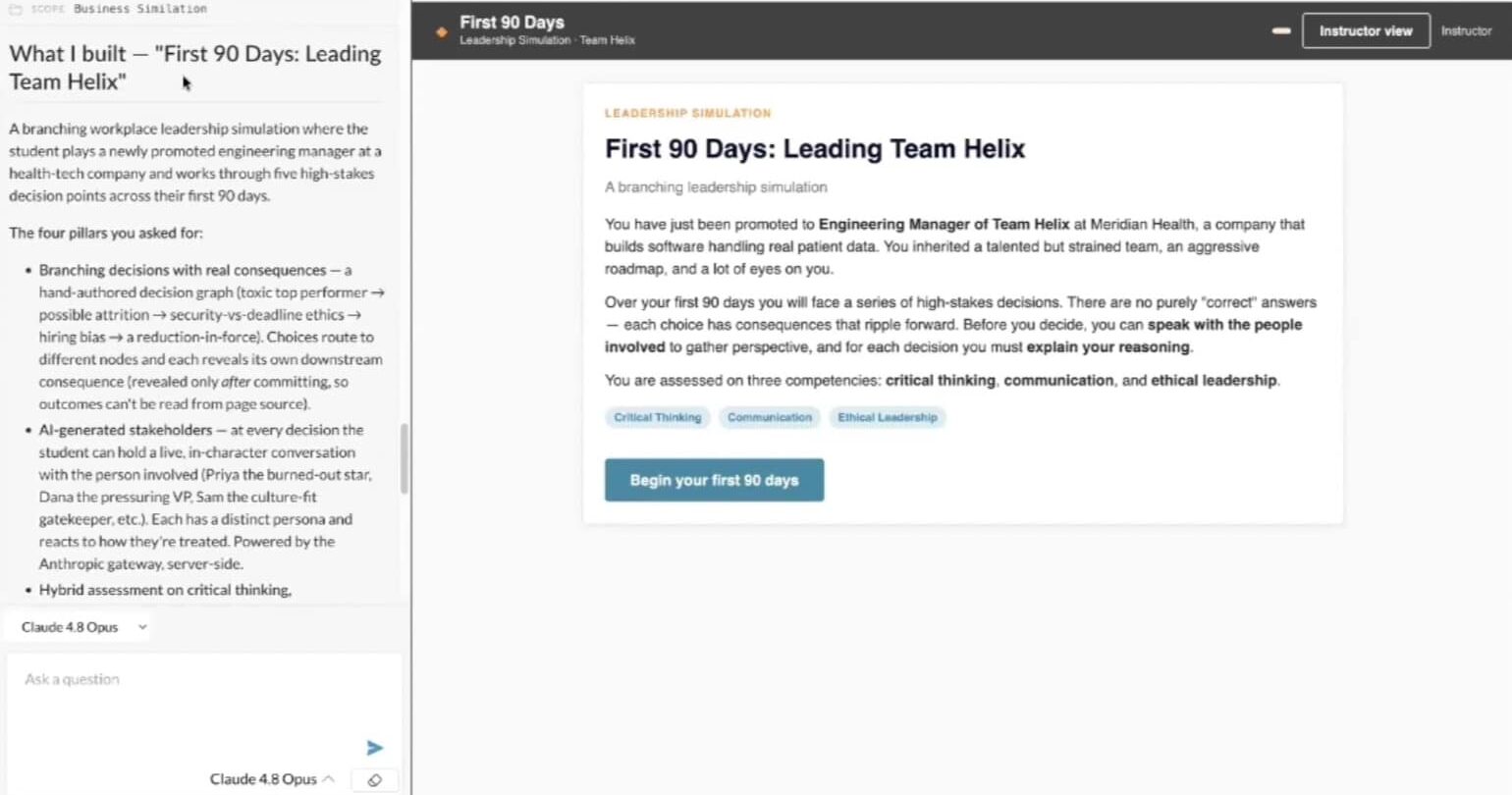
The learner prebrief for The First 90 Days: Leading Team Helix, showing the scenario and the three assessed competencies of critical thinking, communication and ethical leadership
Generated from that paragraph, unedited.
03

Publish the simulation to learners

Share it with a course, add it as an assignment, publish. Learners open it through direct login or your LMS. The session showed one running inside a Canvas course through LTI, with authentication handled by the platform.

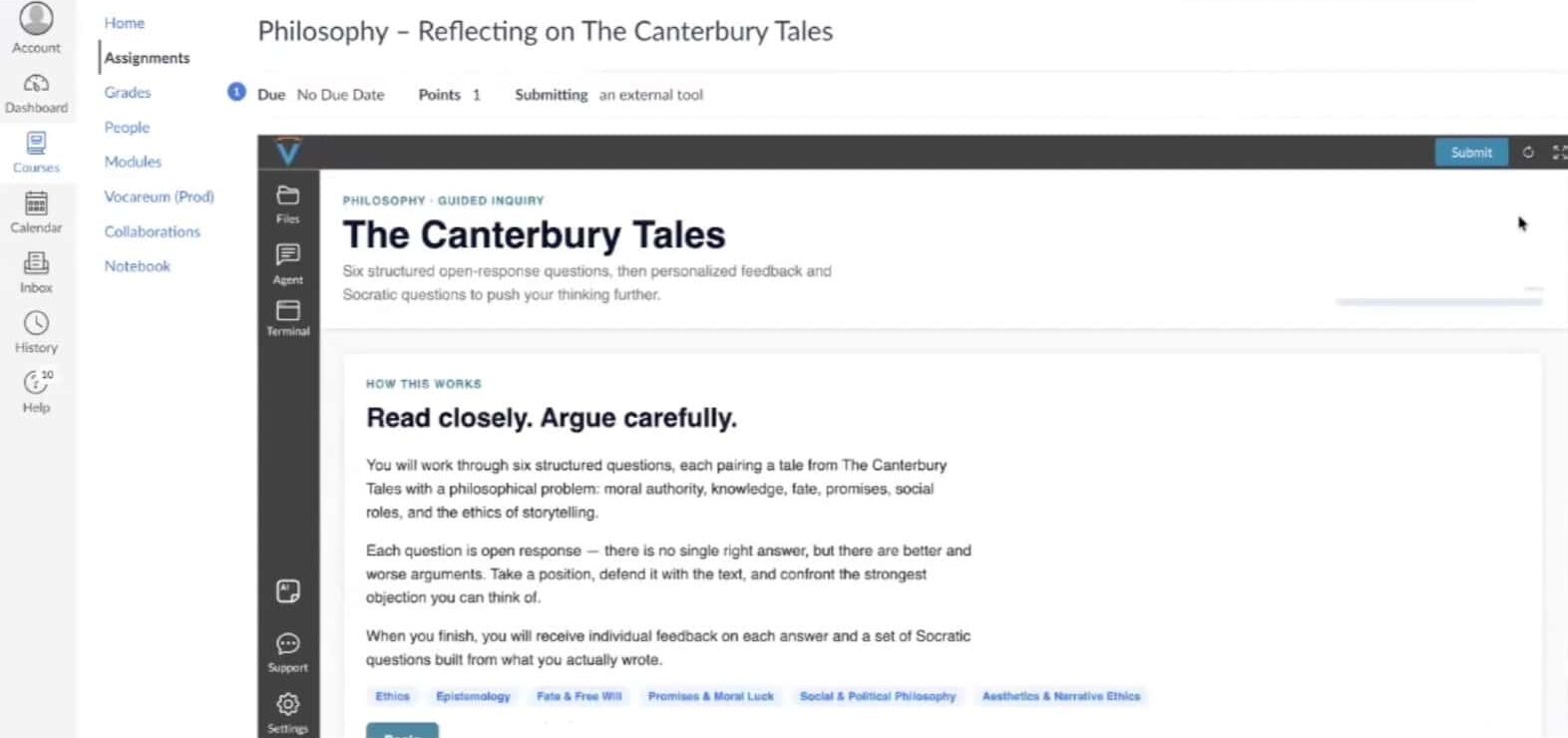
An Atlas-built philosophy assignment running inside a Canvas course through LTI, with Canvas navigation surrounding the framed Vocareum app
A different Atlas assignment, launched from Canvas. Outside the frame is Canvas. Inside is Vocareum.
Questions and answers

What attendees asked about building AI simulations

These exchanges came from the live session’s Q&A and chat, which the published recording does not include.

Can Atlas simulate a specific product or system?

Yes, and this is one of the more common use cases.

Customers have simulated electronic health records, where a program cannot realistically give every student a live production account, and chatbot interfaces, where an organization does not want to hand every learner a commercial AI account. You can use a screenshot as a reference for building an interface simulation, subject to copyright considerations, which the team flagged directly on the call.

Share it with a course, add it as an assignment, publish it.

Learners open it through direct login or through your LMS. Vocareum integrates with Canvas and other LTI-compliant systems, and the application runs framed inside the LMS page. Whether learners can also reach it through direct login is a course setting. The platform handles authentication through LTI or SAML.

Through a rubric Atlas generates and you can revise.

Scoring can be purely deterministic based on decision-path weights, fully AI-assessed against a rubric, or a hybrid of preset points plus AI feedback. Configured as an assessment, the raw attempt transcript posts to Vocareum’s grading API so results become numeric grades that can pass through to an LMS. Instructor dashboards show class-level metrics and per-learner detail, and you can request additional KPIs in a sentence.

Atlas can use models from multiple providers, as well as open-source models an organization runs in its own data center. The AI Gateway issues the keys used to build and to run applications, and supports fine-grained budgets, moderation controls, and bring-your-own-key, so an organization concerned about data being used for model training can operate under its existing cloud agreement.

Partially today, and it is an active roadmap item.

Accessibility guidance is part of the context Atlas builds against, and the team wants to tighten it so applications are easier to release without additional remediation. On the call, the team said a customer should expect to do its own verification today, and that the goal is to move this from something you prompt for into a built-in capability.

Yes. Several institutions plan to deploy it as a tool for faculty.

You can share an application with a class, or open it up for non-academic use inside an organization. The same platform guarantees apply either way: the underlying platform handles scalability, security, and authentication rather than each application.

Yes. You can build teams, and team support is standard on the Vocareum platform.

One learner’s interaction can affect another learner or another team when the instructor intends it, because on the back end each team shares a database. So a simulation where one team’s decisions move a market the other teams are trading in, or where a handoff passes state between learners, is within what the platform supports.

Yes. Give Atlas design specifications, or ask it to emulate a familiar interface.

Prompting with “emulate the design of ___” gives a build a familiar feel, and you can supply design specifications directly. A screenshot can serve as the reference. The team flagged copyright on the call as the thing to be careful about when the interface being emulated belongs to someone else.

Atlas supports speech-to-text and file upload today. Audio output was described as something that can be added.

The platform supports speech-to-text along with image and file upload and transcription, and you can request either as part of an Atlas build when your organization enables the relevant models. Audio output was described as something Vocareum can add, which reads as a capability the team would build rather than a setting that exists today. One nursing simulation shown during the session included video and sound.

It lives on Vocareum and integrates into your LMS through LTI. It requires an internet connection.

The simulation does not sit in the LMS itself. It runs on Vocareum and appears framed inside the LMS via LTI. Because Atlas applications are web apps, there is no offline access. Learners can authenticate to Vocareum directly or through SAML.

Not today. An API for retrieving simulation results does not exist today, though the team said they could add it. What does exist today is the grading path: configured as an assessment, an attempt’s raw transcript posts to Vocareum’s grading API and results can flow to your LMS gradebook.

Either model works: student pay or institution pay.

Pricing can be student pay or institution pay. For pricing specific to your program, talk to us rather than relying on this summary.

Read the full transcript The 47-minute recording

A cleaned transcript of the published recording. Filler, crosstalk and transcription errors have been removed and product and clinical terms corrected; what was said is otherwise preserved. The recording covers the demonstration, so the live Q&A that followed it is not included here.

Introducing Atlas

Sanjay Srivastava, Founder and CEO

Hello, everyone. Thank you so much for joining us for this webinar. We are really excited to be introducing Atlas. We sort of gave a preview at a conference two or three weeks ago, and it was really exciting to see all sorts of things that people are imagining. But what is Atlas? It is an agentic harness which is purpose-built for education.

I'm Sanjay Srivastava, founder and CEO of Vocareum, and I'll give you an overview of Atlas. Hopefully I'll be done within 5 to 10 minutes, because the main point of today is a live demo. So I'll hand it to Mary Gordanier here and Andrew Liang, who will go through the demo of Atlas, and then we will open it up for Q&A. But throughout the webinar, please go ahead and ask your question in the Q&A section of Zoom, and there are a few of us who can try to respond as we are presenting.

Also, one of the unique things which we want to do: if you have a simulation that you want to try to have built live, please go ahead and drop a prompt in the chat. For example, you can say things like, hey, build me an EHR app, or build me an app which will teach students about gravity or whatever, and we'll try to build this app live.

What Atlas is

What is Atlas? It's an agentic harness for education. We built it from the ground up. If you're familiar with things like Claude Code and Codex, their focus is primarily to help you build code. Atlas was built for helping you build learning experiences for education. One of the design principles: you should be able to interact with it only with natural language, and you should not need any technical skills, so we are hoping that it'll be deployed in all sorts of non-technical fields.

It is model agnostic. You can bring in your own model, and it could be Claude, OpenAI, Gemini, or even your open source model, if you have some open source model that you're deploying on on-prem data centers. The big thing, once again, is purpose-built for education. So it understands things like roles like teachers and students, and tasks like assessments and debrief and feedback. And really important, that is built on our platform, so that you can deploy really quickly in your LMS.

The platform underneath

Sanjay Srivastava

It is built on top of our Vocareum platform. So once you go ahead and build the application, what you get is, straight out of the box, scale. This is the platform which scales to about 5 million learners. Last year alone, we had 1 million unique learners. All the security guardrails are built in, and you don't have to worry about it: things like authentication, either coming through LTI or SAML, and other application-specific capabilities, like worrying about accessibility or quality of the platform.

Two specific Vocareum components that I want to call out are AI Gateway, this is how we deliver GenAI API keys for any platform, and this is what we are using for Atlas, so you can determine what model, and also put budgets at a very fine level, and put moderation control if you need it. For example, if you're worried that your data is not used to train models, then you can bring in your own key. Maybe you have an agreement with Azure or AWS, and we can use that. And the lab platform itself, which is a container which you use for delivering all sorts of our coding environments, and it has access to all the features like persistence and scalability.

What customers have built

Some of the applications that our customers have built are things like simulating an application itself. For example, one of the healthcare use cases, like you're teaching people how to use the EHR, and you can't get access to give your student, let's say, an Epic. You can build an application. Chatbot was a surprising use case: maybe you don't want to give every student access to ChatGPT or Claude. So you can actually simulate using Atlas a chatbot. Virtual patient for nursing, that has been a really big use case. Business simulations, soft skills, maybe you're teaching someone how to handle a different sort of customers in an IT support role or a financial advisory role. And even foundation courses like math, physics, chemistry, maybe you're trying to build some simulation to drive home a specific concept.

The platform tour

Mary Gordanier, Solutions Engineer

Nice to meet you. I'm Mary Gordanier, and I'm a solutions engineer at Vocareum. Today Andrew and I are going to take you through the Atlas platform and show you what's possible. If you got some of our emails about this webinar, you're probably aware that we asked for folks to suggest what they'd like to see us build live in this demonstration. So we'll actually be building one of your requests today, which will be a business simulation. Then Andrew will show you the depth and breadth of some of the things that you can build in there. We'll come back and check out the built application that we've made together, and I'll show you how easy it is to connect and deploy that to students. So not just the ease of building the app, but the ease of actually getting it into your learners' hands.

Inside the Vocareum platform

So what you can see here on my screen is the Vocareum platform, and in here we have Atlas. We also organize things in courses for distribution to students. All of these are apps that I have here available, and each of these can be distributed to as many courses as you'd like.

And just to give you a quick preview of what that might look like when a student comes in: this is one of the applications that was built using Atlas, and it's an AI literacy course for students. So it includes not only information, but it also includes some knowledge checks, and can assess students and give them feedback. The only part of this that is going to be sort of standard is these two bars here; everything else you're seeing in here is the app itself that's built and fully customized. Very minimal user interface that's sort of shared, and everything else fully under the control of the person building out the app.

Starting the build

Mary Gordanier

So one of the points here is to make that building process as streamlined and easy as possible for any user. So what we're going to be building today, let's just call it “business simulation.” And when I create the application, it's going to do a few things. It's going to set up my building environment. It's going to initialize an application and a system that has a lot of context already in it.

So the difference between using this and going straight into Claude Code, or building something with ChatGPT, one of them is that it already has the context that you're building a learning application. It has a lot of insights into how to do that in an ideal way, and it has a lot of tools that hook into the Vocareum system so that it can be deployed seamlessly. I myself have built a lot of simulations with AI over the past couple of years, and I can say that, at least in my experience, this is a much quicker way to do it.

Entering the prompt

So I'm going to go ahead and verbatim put in the suggestion that we got here. I'm just going to say, build this app. And here's a suggestion we got: a branching workplace leadership simulation where students make a series of high-stakes management decisions, receive realistic consequences, interact with AI-generated stakeholders, and are assessed on critical thinking, communication, and ethical leadership.

Here you can select what model you want to use to build. All of these models are connected through our AI gateway, which makes it really easy to connect a bunch of different services and models into Vocareum and manage and budget usage, both for people building apps, but also for your students. And this AI gateway will also be used within the application itself, since this app is going to include, at runtime, these AI-generated stakeholders. So I'm going to use Claude Opus for this one, and I'm just going to send the prompt.

The design questions Atlas asks

Mary Gordanier

So right away, it's going to send this through our gateway to Claude. It's going to start by understanding its environment. So it has this sort of system for understanding all the resources it has available to it, and it's going to build from there. While this is building, typically, sometimes it will actually give you the opportunity to input answers. So it'll ask you some questions about your application. So in this case, it's actually asking me some interesting questions here about design.

How should the branching scenario content be created? So, shipping one full scenario. This is AI authoring a complete, polished leadership scenario and decision tree, and so that's going to be one that can get graded immediately. AI-generated on each run, so this would be a fresh scenario dynamically for each student, so more variety, but it's less controllable or consistent. So if you were trying to assess students on their performance, you probably want to give them all the same simulation. And then instructor-authored, so this would be a scenario authoring user interface that instructors can write their own trees. So that would be no default content, but just the sort of tool for instructors to insert their content in here. I'm going to have it just ship one full scenario so we can see the finished application.

Scoring and the rubric

And then it asks how students should be scored on critical thinking. So here it's saying an AI-scored rubric; decision path weights only, so competency points and no AI will be needed for grading; or a hybrid where there's preset points and AI feedback. So I'm going to choose hybrid here. And then, how should the AI stakeholders behave, interactive chat per decision, or scripted reactions only? I'm going to let it generate interactive chats per decision.

So that is the full set of questions it's going to ask. It asked me them all at once. And now I can just let it run. Typically this takes, depending on the application scenario, it can take 10 to up to 30 minutes. I've run this one before and it's typically around 15 minutes. So while it's running, I'm actually going to hand off to Andrew to show you some of the simulations that he's built using Atlas.

The nursing simulations

Andrew Liang, Product Manager, Atlas

Thank you, Mary. Hello, everyone. I'm Andrew, and I'm the product manager for Atlas, and I'm really excited to show you all just how powerful Atlas is and some of the incredible things you'll be able to make with it easily. At Vocareum, we want interactive simulations and assignments to be available to instructors not in months or weeks or days, but minutes. And we want them to be tailor-made and easily created with natural language. You will talk to Atlas as you would me, or a colleague, or anyone else, and it will understand and adhere to your instructions and requirements. In fact, the more detail you provide it, the better your simulation will be. So each of these examples I'm about to show you was made in under an hour, many within 10 to 15 minutes.

Hypoglycemia recognition

We'll begin with our simplest example. This is the first of our nursing education simulations. So there are three provided scenarios: post-op hemorrhage, sepsis recognition, hypoglycemia. We'll go with the easiest one, because that'll make it harder for me to embarrass myself. So we'll begin with the pre-brief screen, which, along with the debrief, is essential in all nursing simulations. As you can see, we have our learning objectives, our competencies that we're covering, and the case. We have our chart here, patient report, the learner's role, and the environment described. Our safe container agreement.

So we'll see that this is a simple decision-tree-based simulation. The patient's vitals will change as we progress through the case, and we'll have to respond accordingly with the correct interventions. Notice, however, that there is an AI preceptor that a learner can interact with to reason through their clinical decisions. Of course, an instructor can easily add or remove this by just asking Atlas to do so, you don't have to use it. Or you can even customize the nature of the AI's feedback to perhaps something more Socratic, because we want the students to reason clinically and arrive at the answer, not for AI to give it away. So maybe I'll say, please provide some guidance.

Andrew Liang, reading the AI preceptor

Working the case

“You're picking up on some important cues already: confusion, diaphoresis, tremor, and insulin given 40 minutes ago with no breakfast noted. That cluster is telling you something specific. Notice what's missing in your vitals: the glucose reads null. Before you can treat, what's one piece of objective data that would confirm your suspicion and guide everything you do next? What's the quickest way to get it?”

Andrew Liang

It sounds like I should check a point-of-care blood glucose at the bedside right now. “Correct. Any patient on insulin with acute confusion, hypoglycemia is the fastest reversible cause. Check glucose first.” Oh, and now that's blinking red and her condition is deteriorating. So now I think we'll give her 15 grams of a fast-acting oral carbohydrate.

I'm watching her closely. I think she's ready for breakfast, gang. She seems better. Let's give her some breakfast. “Reconsider, recheck the glucose first; breakfast comes after the acute episode is resolved.” So as you can see, the vitals are reacting, and we're near the debrief here. What's our follow-up? She's no longer diaphoretic, and I'll place her NPO until the provider rounds. I'm not cut out to be a nurse, everybody.

Okay, there we go, see the outcome. So provider notified of mealtime insulin timing. “You caught a common, dangerous cause of confusion; close the loop to prevent it happening again.” And now we'll arrive at our debrief screen. 50%. 5 total missteps, that's on me again. Analysis of our decisions. And of course, the learner can debrief here with the coach to go over their clinical reasoning and their decisions. Here are the guidelines and evidence that the content of the scenario is based on. And then a short summary. So remember, this was our simplest example, and created quite literally in minutes.

The shift simulator

Andrew Liang

Nursing shifts. So this is a shift simulator. Again, we have our pre-brief page and debrief page at the end. As you can see here, we have our learning objectives and the competencies we're assessing. This is a little more complicated. As we proceed through the shift, we're going to review patient charts, work through our tasks, and advance the time until we've arrived at the end of our shift. So: “welcome to the shift. You are the day shift nurse on 4 West Medical-Surgical unit. We have 5 patients at 7 o'clock, and you've just been given report. Select the patient, review the chart, work through the tasks, and advance the sim clock.”

So as you can see, a little more complicated than the previous simulation. Each patient has their summary, MAR, vitals, orders, blood work, and notes. So let's look at what's in Maria's MAR. It says insulin lispro, and it looks like we have to administer it, and it gives us a little note here: check BG before administration. We're going to have to make sure we're administering to the right patient. Let's check the MRN, 284712, on the left. That looks correct.

Administering medications

And so we're administering insulin. Oh, looks like I gave Maria the wrong insulin. And notice that this created a safety event over here on the right that was logged. And now we just have to give her the right insulin. So we're checking BG before administration. This looks right. I'm going to double-check all this. This all looks correct. And we administer it.

Then let's acknowledge this order, sputum culture. Acknowledged. And we're done with Maria. A learner would proceed with the rest of the shift, and of course the preceptor's on the bottom if they have any questions that they need guidance on. And of course the AI is aware of everything that's going on within the simulation, so it can answer those questions. As they proceed through the rest of their shift, they're going to advance the sim clock here on the upper right, and the events will change, the conditions will change, and their tasks will change.

And we'll skip to the end here. And we'll say we're a very bad nurse, we've left most of our tasks incomplete and we caused safety events. For any other learner, though, they'll be able to, once again, debrief with AI and talk through their decisions and anything else they need feedback on.

Quick assignments

Andrew Liang

We have our most complex at the very end, to demonstrate an even fuller extent of Atlas's capabilities. But we want to emphasize that Atlas can be used to create quick and simple assignments also. Perhaps a nursing student struggling with math: an instructor can simply, with one sentence, create an interactive assignment that treats the learning gap and allows the student to receive the practice they need, and the instructor, an assessment of student competency. So here's a dosage calculation assignment, and a medical record reconciliation assignment.

How many tablets will I administer? And so, for this medical record reconciliation assignment, the learner provides specification to the AI for their decision. You have to decide whether the medical records need to be merged, kept separate, or flagged for review. Here we've decided to merge, because all the most relevant personal identifying information is the same. The only thing that's different is the hospital medical record number. And if we go to the next case here, Maria Garcia, it looks like her birth dates are different, her socials are different, but the medical record number is the same. Her address and phone are not on file. We probably flag for review here, I'm thinking.

So these are, once again, very simple assignments. And these are easily created in minutes, and they're just for targeting any learning gaps, much like the math one here, that an individual student might be experiencing, and an instructor can create this interactive assignment, again, in minutes.

Intraoperative malignant hyperthermia

Andrew Liang

So this is the most complex nursing simulation we'll be showing today, and the one we're most excited for. So this deals with intraoperative malignant hyperthermia. And I had the help of my friend who's a nurse in making this. Learning objectives here. Core competencies. And down here: vitals move in real time, every action costs time, sequence matters. The clock keeps running while you decide. You'll get a full scored debrief with rationale at the end. So what we're going to do is we're going to go to instructor mode, right here. So in instructor mode, the timer is paused and the sequence is written out for us, so we don't make any mistakes.

And we'll just begin the simulation. So normally, as a student goes through this, we'll resume the timer here. The timer will continue. The patient's condition will deteriorate live in response to that time, and as a response to the interventions that the learner chooses. So even though this timer is paused right now, you'll see that if I declare a malignant hyperthermia emergency, which is the first correct step, time will increase by around the time that it takes to do any of these interventions. You'll see that each of them has an associated time cost. And obviously the patient's vitals change as a result of that. Next step seems to be discontinue all triggering agents.

Running the crisis protocol

We can let the time play, actually. We have the answers, gang. So we're going to call for help, notify the surgeon, get the MH cart. Going to hyperventilate with 100% O2. But if a student's having difficulty, they can click on clinical consult here, which automatically pauses the timer. It locks the decisions, and they can ask for help. And once they finish consulting with AI, again, if the instructor enables it, you don't have to use this, but once they've closed this, the clock automatically resumes, and they have to continue. And you'll see, of course, every event is being logged, patient's vitals are changing in real time.

Send stat labs. We're going to insert the Foley. Maintain urine output. Incredibly, I've scored 99. I missed something. I forgot to call the MH hotline. That's actually quite important, according to my friend. So let's see here. All steps. Time to dantrolene. Key teaching points here. So the earliest, most sensitive sign is a rising ETCO2. Once again, the guidelines and evidence that this content is based on. Debrief section for the learner if they would like to use this.

Atrial fibrillation detection

Andrew Liang

So that is our most complicated simulation in terms of nursing. Actually, I'm going to show everybody one more, because I forgot to show it. This is a nursing AFib detection simulation. My objectives, competencies again. And obviously visuals and sound are not an issue for Atlas as well.

Interpret the cardiac rhythm. Sinus tach? Probably AFib. Select the appropriate nursing actions. “Immediately defibrillate the patient,” that looks a little aggressive. Let's go with these. Maybe I cheated. Maybe I knew that these were the answers. We'll keep that between us. The learner will just proceed through the six cases, doing the exact same thing.

The business simulation

Andrew Liang

So that's all for the nursing simulations. I know there are probably some business people and faculty here who are wondering whether Atlas's capabilities can be applied to enterprise and business education simulations as well. And the answer is an emphatic yes. Let me just go over one business simulation, as I go over my time limit.

So let's name our company Andrew Incorporated. So we're just going to select between four parameters here. Every quarter, looks like we have six quarters. We start with half a million cash on hand. So every quarter there is a random event that happens. “Stable market” here, conditions are predictable.

So let's set our unit price here to, yeah, let's be greedy. $100. All right, R&D, never heard of her. All right, production volume 7,000 units. Let's run the quarter. Hopefully we make some profit. Oh, look at that. I made some profit. That's actually crazy. “Market boom, the economy is surging and buyers are plentiful.” You know what? $150. We can spend a bit on marketing now. Let's spend a little bit on R&D. Production volume 9,250.

Market events and results

Okay, we made a little less profit. “Economic recession.” Well, I think people can still afford to pay $150 for this. We won't spend anything on marketing, though, and R&D, and we'll produce 10,000 units. So we lost $100,000 this quarter. Not what I was hoping for. Stable market again. What happens if we just give it away for free? No. $30. Maybe marketing, maybe we're just missing marketing. Maybe we're missing R&D too. Okay, lost another 80,000. Another recession. I think we're in the red now, gang.

“Supply chain shock. Input shortages drive my unit costs up steeply this quarter.” I don't like this. We're losing, we're losing, gang. Come on, let's finish strong. Okay, awesome. $129,000 for this quarter, and we'll take a look at our debrief. I got a C. C's get degrees. And in cash, half a million; total profit 75,000. I'll take it.

We'll have our results here. And of course, obviously an instructor can ask for more KPIs, or different KPIs that they care about. So this was done as a student. A teacher viewing this is going to see the teacher dashboard. And we'll see their class metrics listed here. Obviously, there's only one student. Their company was Andrew Incorporated. And then you can view the students at an individual level. So if there are any other metrics or KPIs that the instructor wants, that's also a one-sentence request away.

In this segment the speaker also compared Atlas to the cost and lead time of commissioned custom simulations, citing figures from his own experience. That comparison was unscripted and is not a Vocareum pricing claim, so it is not repeated in the summaries on this page.

The finished leadership simulation

Mary Gordanier

Thanks so much, Andrew. I'm excited to share this business simulation with y'all. So here's what happened while Andrew was giving you guys some walkthroughs of some of the apps we've built. We started up here, this is, I think, where we left off together. It gave me some prompts to find out what I wanted to do.

So, like Andrew mentioned, the inclusion of AI in the app when it's running for students is totally optional. So you can just use AI to build, build an application that's going to behave exactly the same for every student, that's deterministic, and have that be what runs. Or you can allow AI to generate the app when it runs; you can allow AI to interact with the student dynamically. And we gave it a little bit more free rein to simulate some conversations with the student, and also give the student feedback. So that's what we're going to see today, based on our choices.

As it's going, it reports out what it's working on. It also gave me a nice little checklist that it worked through, including telling me what it was working on while it was working on it, and then it's telling us what it built here. So: “The First 90 Days: Leading Team Helix.”

Mary Gordanier, reading the learner prebrief

The learner prebrief

“You've just been promoted to engineering manager of Team Helix at Meridian Health, a company that builds software handling real patient data. You've inherited a talented but strained team, an aggressive roadmap, and a lot of eyes on you. And over your first 90 days, you will face a series of high-stakes decisions. There are no purely correct answers. Each choice has consequences that ripple forward. Before you decide, you can speak with the people involved to gather perspective, and for each decision, you must explain your reasoning. You're assessed on three competencies: critical thinking, communication, and ethical leadership.”

Mary Gordanier

AI likes to come up with fake companies, but that can be really helpful for giving students a realistic scenario. So that's the intro to the simulation. It worked with the four pillars that we asked for. We have branching decisions with real consequences. We have those AI-generated stakeholders. And we have hybrid assessment on critical thinking, communication, and ethical leadership. So it's generated a rubric here that, if we wanted to change how it was grading, we could have it modify that rubric. So that part is going to be a combination of AI assessment and a static rubric that it's assessing from, that we can refine exactly how we want.

Grading and instructor views

And then platform submission. So the raw attempt transcript is going to be posted to Vocareum's grading API server when the assessment is set up, if it's set up as an assessment. So right now it's not in a setting where it is set up as an assessment. It's sort of standalone, but we could integrate it into an assessment, and then it would push those results through. So it can work in a context where those grades are translated into numbers that can be used, for example, pushed through to your LMS. Or not.

It also is access-control role aware. So that means that there's an instructor view that only people registered as teachers in Vocareum will get to see, and it knows when it's a student, or when it's an instructor. So that's what we built. And actually, it's created a pretty interesting scenario here. So, “your best engineer is driving people away” is my first challenge here as a new leader at Helix. And before I decide how I want to handle Priya, I can actually talk to her. “How are things going with your team?”

And an AI agent actually will work back-end and act as Priya. So I can decide what I want to do with her. If in this conversation she said something really wild, I might report her to HR immediately. I think in this case we're probably going to do specific behavioral feedback. And it's having me explain my reasoning. She needs to, let's say, teamwork requires respect. And so she gets very cranky, and then she admits that she's really, really overwhelmed. So she's working on changing how she gives feedback.

Deploying it to learners

Mary Gordanier

And then the instructor view, this is a preview of it. This isn't connected to live students, so this is just a preview of what the student would see. But you can see for this particular user, I'm going to be able to get a sense of what the student scores are for each of these as they go through the simulation. So a teacher would be able to view this for each student. And if we did connect it to an assessment, these grades could actually feed back into a total score for the student that I can review. And then I'll have a sense of how students are comparing against each other in their work. You can also have it create a leaderboard, so there's a lot of cool stuff that you can work on from here.

So now that we've built that, let's go back and hook it up to an assignment, and I'll show you how quick and easy that'll be. So I'm just going to share it with a course. I'm going to share it with our Atlas demos course. I could also, for example, let Andrew, if I typed in his email here, he could become an editor and help me work on it. But for now, I'm just going to share it with the course.

Adding it to a course

I'm going to go over here to all of the courses for my organization, and I'm going to add it as an assignment here. So, I'm going to add a new assignment. I'm going to have it be “business sim, Atlas.” And here you can see my business simulation is one of the options here. And I will add that assignment. So now it's taking the application I built and adding it to a specific course where it can be assigned to students. And that's where, once it is added here, I can actually do things like set submission criteria, give it the ability to connect to a rubric. If I just publish this assignment, it will be available to my users.

So back to my student who's logged into Vocareum and their Atlas demos course. Here's the business sim that we just built. I think I put this one on LMS, so I'm going to just turn off the LMS integration for it. And that's based on your course settings, whether it will be locked for use only with an LMS, because you can connect it through and have students access it that way, or if students can access it through direct login. So right now, this student is accessing it through direct login.

Launching from Canvas

And while that setting is populating through, I also just wanted to go ahead and show you one of these happening live in an LMS that I've already connected. So this is a Canvas LMS, so we can connect with Canvas, or any other LMS that supports LTI. I've just clicked on a Canvas assignment, so this is sort of framed directly into the LMS. So everything out here is Canvas, and in here is Vocareum. And here is an assignment that I built actually yesterday, talking to a customer who had a philosophy professor who was interested in using the tool for doing student homework that they get quick feedback on, their thinking around a text. So that's the LMS integration there.

Sources and notes Reviewed Aug 28, 2026

How this page was sourced

This page draws entirely from See Atlas in Action: From Idea to AI Simulation, recorded August 26, 2026. The published recording covers the demonstration; the live Q&A and chat that followed it were not included in the upload, so answers drawn from those are marked as such. We attribute figures and capability statements to the speaker who made them.

  • Platform scale. "Scales to about five million learners" and "one million unique learners last year" were stated by Sanjay Srivastava during the platform overview.
  • Build time. Before starting, Mary Gordanier said builds run "10 to up to 30 minutes, typically around 15 for this one." Measured against the recording, the build shown took about twenty minutes. The fifteen-minute figure was her forecast, not the result.
  • Model used. Claude Opus was selected for the live build, through the Vocareum AI Gateway.
  • Roadmap items. Automated content validation and expanded accessibility support were described as roadmap priorities, not current capabilities, during the live Q&A.
  • Comparative cost and lead-time figures mentioned during the business simulation segment were an unscripted personal comparison and are not repeated here as a Vocareum claim.
  • Product documentation: Atlas, Vocareum AI Gateway, Virtual Labs.
  • Full recording: Introducing Atlas, the complete session.
Last reviewed: August 28, 2026 Author: [name] Product reviewer: [name]

See Atlas built around your curriculum

Bring us the simulation or assignment you have not managed to get built. We will show you what Atlas produces for it, and what deployment into your LMS would look like.