Read How UC San Diego GPS Is Bridging Math Gaps with AI Compass

Vocareum AI Notebook

Secure, Cloud-Based AI Notebooks
for Hands-On Learning

Launch browser-based Jupyter environments with preloaded tools, managed AI access, on-demand GPUs, and built-in grading without local setup or infrastructure overhead.

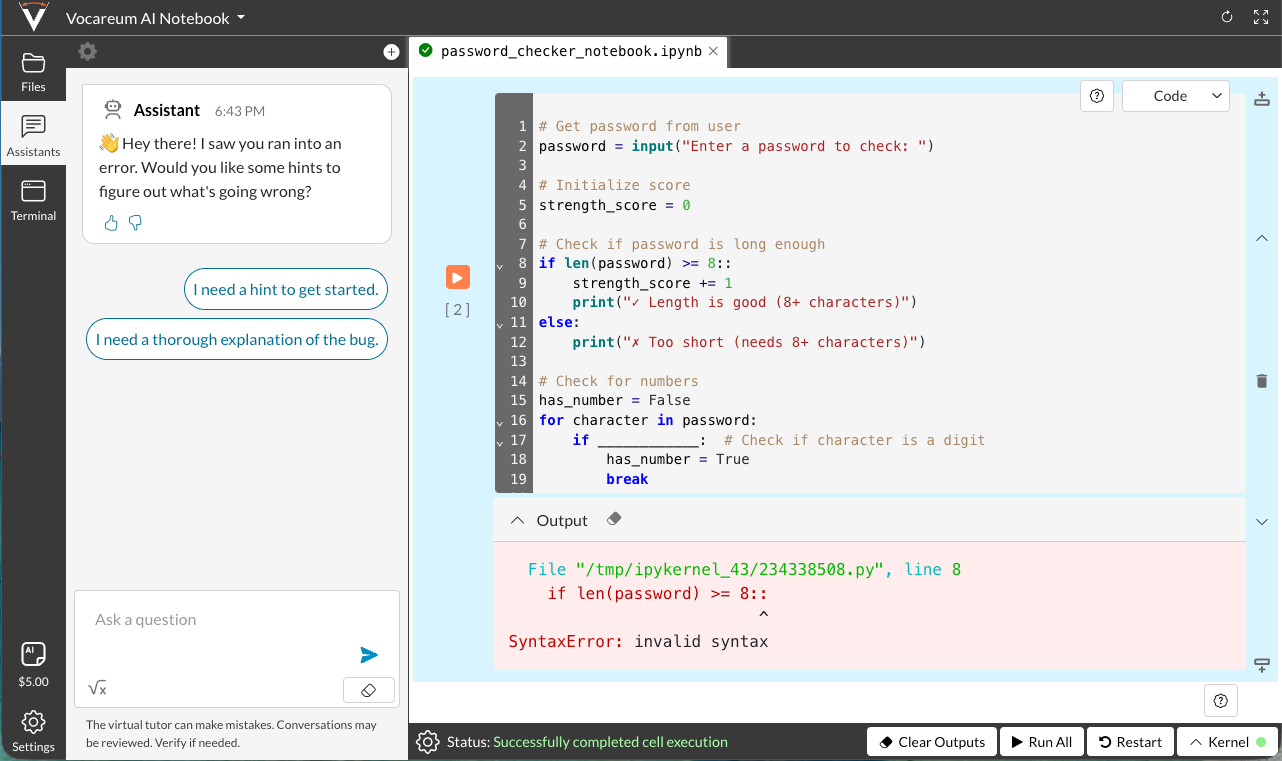
The user-facing notebook experience, powered by Vocareum’s infrastructure, governance, integrations, and assessment tools.

Vocareum AI Notebook interface

Trusted by Leading Universities & Enterprises

Managed AI Model Access For Safe Experimentation

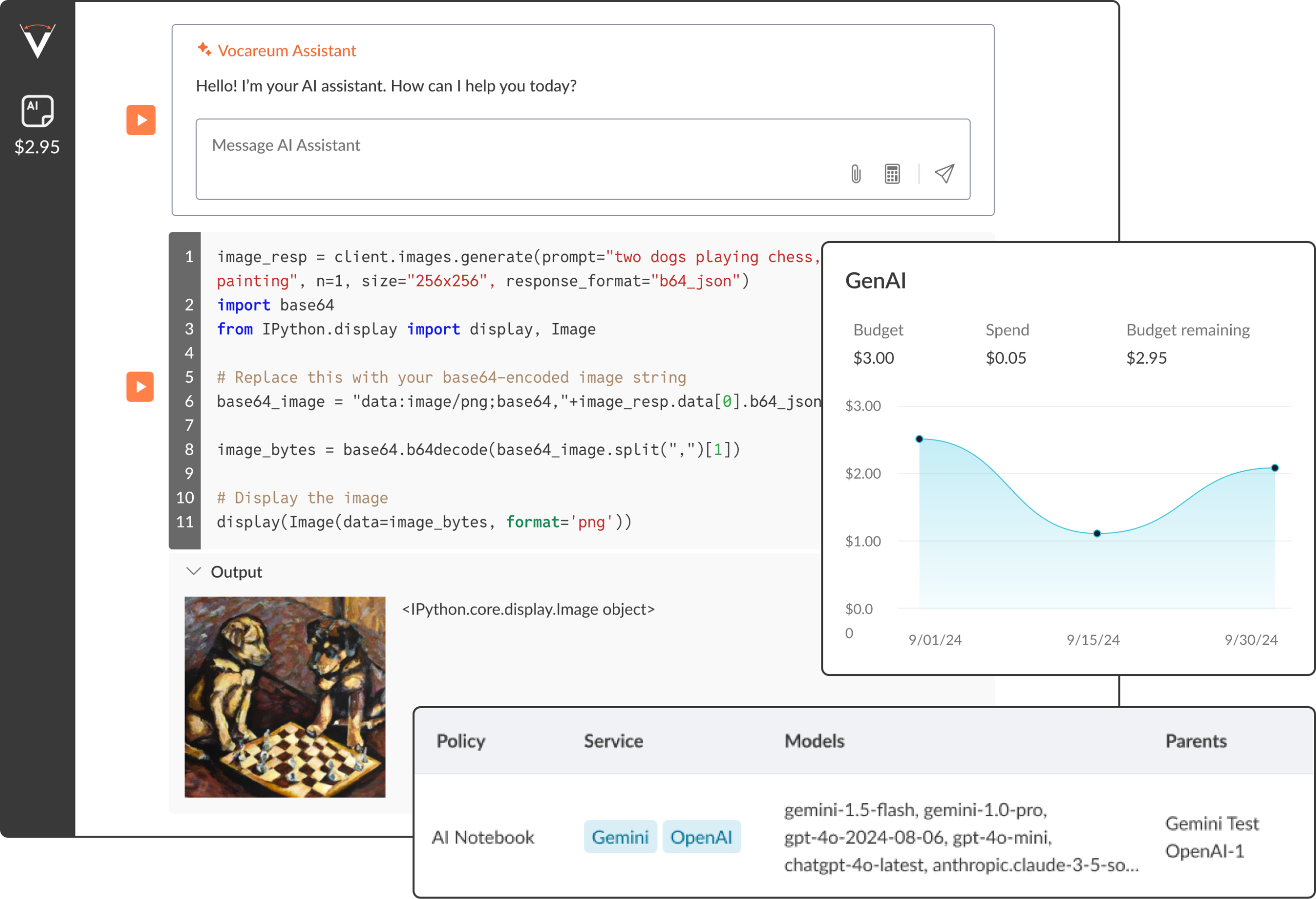
Give learners and instructors governed access to leading models inside the notebook environment, with centralized key management and visibility into usage.

Access Leading Models: Support hands-on work with models like ChatGPT, Gemini, Claude, and more through managed AI access.

Safe Experimentation: Create controlled environments for prompt engineering, experimentation, and AI application development.

Instructional Flexibility: Enable AI-assistants and tutors where they add value to learning.

Budget Visibility: Apply built-in budget controls to help monitor AI usage and keep costs predictable.

On-Demand GPU Access Without Infrastructure Friction

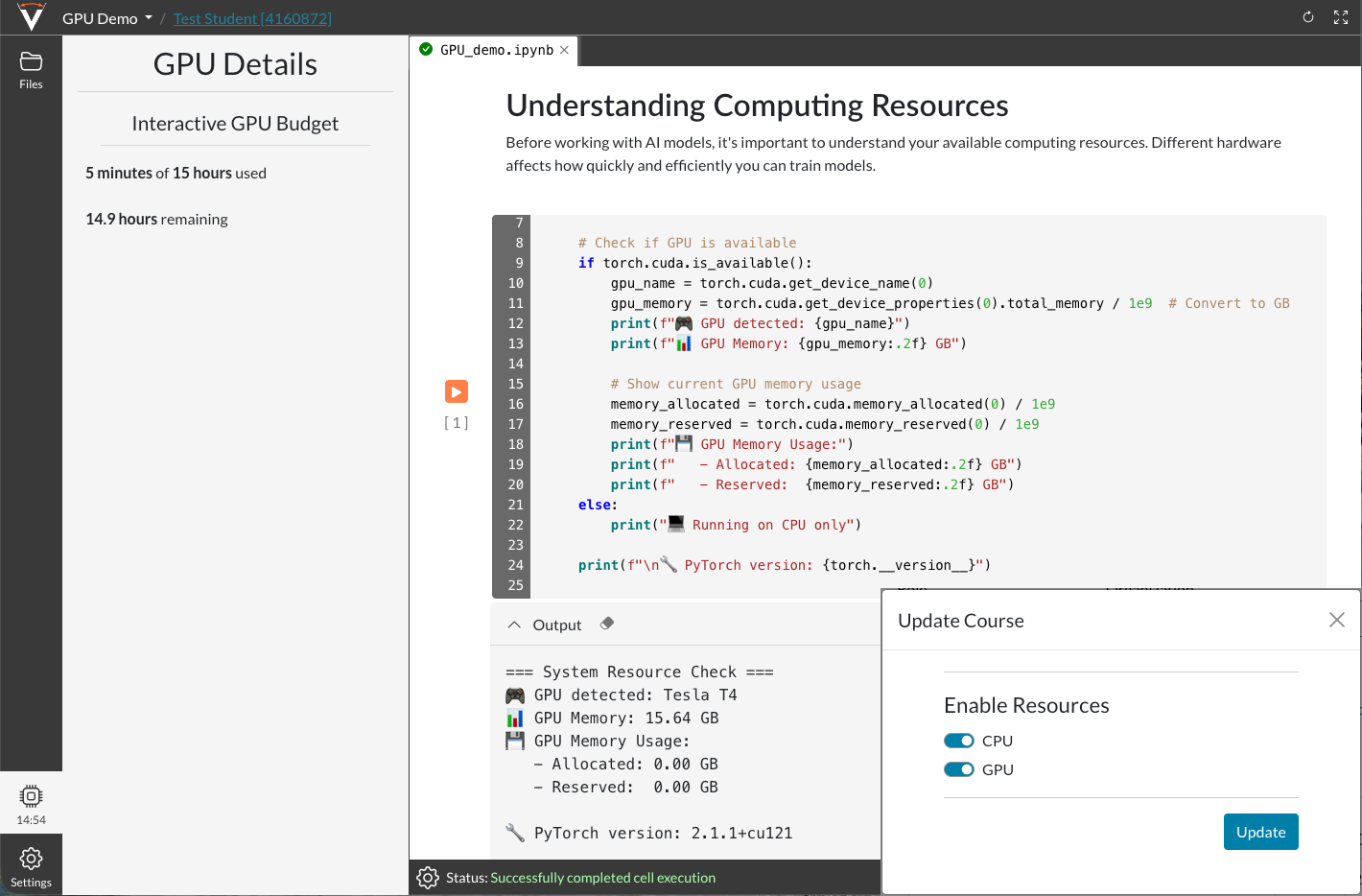
Give learners on-demand access to the compute they need for model training, larger datasets, and heavier notebook workloads, without the overhead of managing infrastructure.

Single-Click GPU Access: Use NVIDIA V100 and A100 GPUs for training AI models without complex setup.

Support Heavier Workloads: Run training jobs and work with larger datasets that go beyond CPU-only notebook environments.

Spend Control: Apply built-in budget controls to help manage GPU usage and keep costs predictable.

Training Workflow Support: Help teams manage and schedule training jobs more efficiently.

Platform Controls For Secure, Scalable Delivery

AI Notebook is backed by the platform controls institutions need to deliver secure, scalable technical learning.

Platform Administration

Centralized API key management

Budget controls & usage analytics

Role-based access controls

Assessment & Grading

Automated code grading

Cell-by-cell notebook evaluation

Rubric-based assessment & AI feedback

Plagiarism detection & similarity scoring

Collaboration & Peer Workflows

Team projects with permissions

Structured peer-review workflows

In-line commenting & discussion forums

Course Delivery & LMS Integration

Multi-step assignment creation

Seamless LMS integration with platforms like Canvas

Real-time grade passback & SSO

Security & Compliance

SOC 2 Type II certification and FERPA-aligned data handling

Granular access controls and audit trails

Encrypted data and isolated user environments

Vocareum AI Notebook vs. Self-Managed JupyterHub

Feature Vocareum AI Notebook Self-Managed JupyterHub
Setup & Maintenance Fully managed, < 5 min setup Complex setup and ongoing maintenance
LMS Integration Native LTI 1.3 integration Manual, often custom, integration
GPU Access Single-click (AWS, Colab, NRP) Manual configuration required
Generative AI Models Built-in access (ChatGPT, Claude, etc.) Requires separate API setup & cost
Auto-Grading AI-powered logic analysis Manual grading or basic scripts
Security & Compliance Enterprise-grade (SOC 2, SAML) Requires manual configuration
Cost Predictable per-student pricing Variable, often unpredictable costs
Setup & Maintenance
Vocareum AI Notebook
Fully managed, < 5 min setup
Self-Managed JupyterHub
Complex setup and ongoing maintenance
LMS Integration
Vocareum AI Notebook
Native LTI 1.3 integration
Self-Managed JupyterHub
Manual, often custom, integration
GPU Access
Vocareum AI Notebook
Single-click (AWS, Colab, NRP)
Self-Managed JupyterHub
Manual configuration required
Generative AI Models
Vocareum AI Notebook
Built-in access (ChatGPT, Claude, etc.)
Self-Managed JupyterHub
Requires separate API setup & cost
Auto-Grading
Vocareum AI Notebook
AI-powered logic analysis
Self-Managed JupyterHub
Manual grading or basic scripts
Security & Compliance
Vocareum AI Notebook
Enterprise-grade (SOC 2, SAML)
Self-Managed JupyterHub
Requires manual configuration
Cost
Vocareum AI Notebook
Predictable per-student pricing
Self-Managed JupyterHub
Variable, often unpredictable costs

Solutions for Every Educational Need

Higher Education

Support hands-on learning in AI, data science, cloud, and cybersecurity across college and university programs. AI Notebook gives instructors a browser-based environment for delivering technical coursework with less setup overhead and more consistency across cohorts.

Benefits:

LMS integration with platforms like Canvas, Blackboard, Moodle, and Brightspace

Standardized environments for consistent delivery across sections

Built-in grading and assessment tools to reduce manual workload

Access to real tools, datasets, and notebook-based workflows

Corporate Training

Deliver hands-on training in GenAI, cloud, data, and security with notebook environments that help teams build practical skills and apply them on the job.

Benefits:

Track learner progress and skill development


Provide secure, role-based access across teams

Customize environments with your own tools and content

Support product, technical, and upskilling programs in one environment

Online Programs & MOOCs

Deliver notebook-based technical learning at scale for both cohort-based and self-paced programs. AI Notebook supports large learner volumes with browser-based access and consistent environments across global programs.

Benefits:

Support hands-on learning across AI, cloud, coding, and data

Deliver a branded experience with white-label capabilities

Integrate with platforms such as edX and Coursera

Scale more efficiently across large online cohorts

Certification & Test-Prep

Create hands-on practice labs and performance-based assessments that measure real technical skills, not just multiple-choice recall.

Benefits:

Use real-world scenarios to assess applied skills

Deliver secure environments for testing and practice

Provide automated grading for faster results

Improve readiness with practical, notebook-based exercises

Technology Companies & ISVs

Support product adoption, developer enablement, and customer training with on-demand notebook environments for hands-on learning, trials, and technical onboarding.

Benefits:

Embed hands-on environments into product and training experiences

Deliver developer and customer education more effectively

Provide secure, sandboxed environments for demos and practice

Give users access to real tools and workflows, not simulations

Support Guide

Frequently Asked Questions

What Is Vocareum AI Notebook?

Vocareum AI Notebook is a cloud-based, Jupyter-powered environment for hands-on AI, data, and coding workflows. It provides browser-based access to preloaded tools, managed AI model access, on-demand GPU resources, and built-in grading without local setup or infrastructure overhead. This notebook experience is supported by Vocareum’s infrastructure, governance, integrations, and assessment tools.

AI Notebook supports managed access to leading models such as ChatGPT, Gemini, Claude, Mistral, and Llama2 within the notebook environment. Centralized key management, built-in budget controls, and usage visibility help institutions support experimentation more safely and manage usage more predictably. Instructors can also enable AI assistants and tutors where they add value to learning.

Learners get single-click access to NVIDIA V100 and A100 GPUs for model training and other compute-intensive workloads. To help manage costs, interactive sessions can be limited to CPUs, with GPUs reserved for more intensive training jobs and governed through explicit hourly budgets. AI Notebook also includes an automated training job scheduler to support efficient model training and larger dataset workflows.

AI Notebook includes built-in assessment tools for hands-on technical learning, including automated code grading, cell-by-cell notebook evaluation, rubric-based assessment, AI feedback, and plagiarism detection with similarity scoring. The platform also supports peer review workflows and grading analytics to help instructors evaluate learner work more efficiently.

AI Notebook integrates with major LMS platforms, including Canvas, Blackboard, Moodle, and Brightspace, through LTI 1.3. This supports single-click access, deep linking, and grade passback. For enterprise authentication, the platform also supports SAML 2.0 SSO, with integration options for identity providers such as Active Directory, Okta, and Azure AD.

Yes. AI Notebook supports collaboration through team projects with permissions, structured peer review workflows, in-line commenting, and discussion forums. These features help learners and instructors work together more effectively across hands-on technical projects.

Yes. Instructors can customize learning environments by preloading specific tools, datasets, and starter code to align with course goals and technical workflows. This makes it easier to support everything from introductory coding exercises to more advanced AI and data projects.

Skill Up

Ready to Deliver Secure, Browser-Based

AI Notebooks At Scale?

See how Vocareum AI Notebook helps you launch hands-on environments with managed AI access, on-demand GPUs, built-in grading, and the platform controls needed for scalable delivery.